





Mobile App Testing Strategies for High-Performance Apps

- Why Mobile App Testing Is a Strategic Function
- Types of Mobile App Testing That Actually Matter
- Mobile Application Testing Process: A Structured Approach
- Key Performance Metrics You Cannot Ignore
- Mobile Testing Best Practices That Scale
- Best Tools for Mobile App Testing
- Testing Methods vs Use Cases
- Common Mobile App Testing Challenges
- Mobile App Testing Checklist
- Suggestions to Strengthen Your Testing Strategy
- Closing Thoughts
- About iProgrammer
- FAQs
You don’t notice a great mobile app when it works well. You notice it the moment it doesn’t.
A delayed checkout. A screen that freezes mid-scroll. A crash during payment. These aren’t edge cases. They are everyday failures that quietly push users away. Most teams don’t lose users because of missing features. They fail as a result of their inability to stand out from reality.
This is where structured, organized testing strategies for mobile applications cannot be ignored.
Testing is no longer just a process at the end of the development period. It is something that happens all throughout and determines the efficiency of the app once used by consumers. Efficiency and ease of use of any software largely depend on the amount of testing performed during its development.
In this article, we shall talk about the latest approaches to testing mobile apps, methods applied, as well as performance measures to focus on.
Most teams still treat testing as a validation step. That assumption creates blind spots.
A mobile app operates in unpredictable environments. Network conditions vary. Devices differ in processing power. User behavior is inconsistent. Even OS updates can introduce unexpected issues.
The benefits of an organized mobile application testing strategy include:
- Early identification of performance issues
- Lowering production errors and chances of rework
- Consistency in user experience on different devices
- Greater user loyalty and engagement
- Maintaining the integrity of the brand
If done strategically, testing will not only become mandatory but also a competitive edge.
Types of Mobile App Testing That Actually Matter
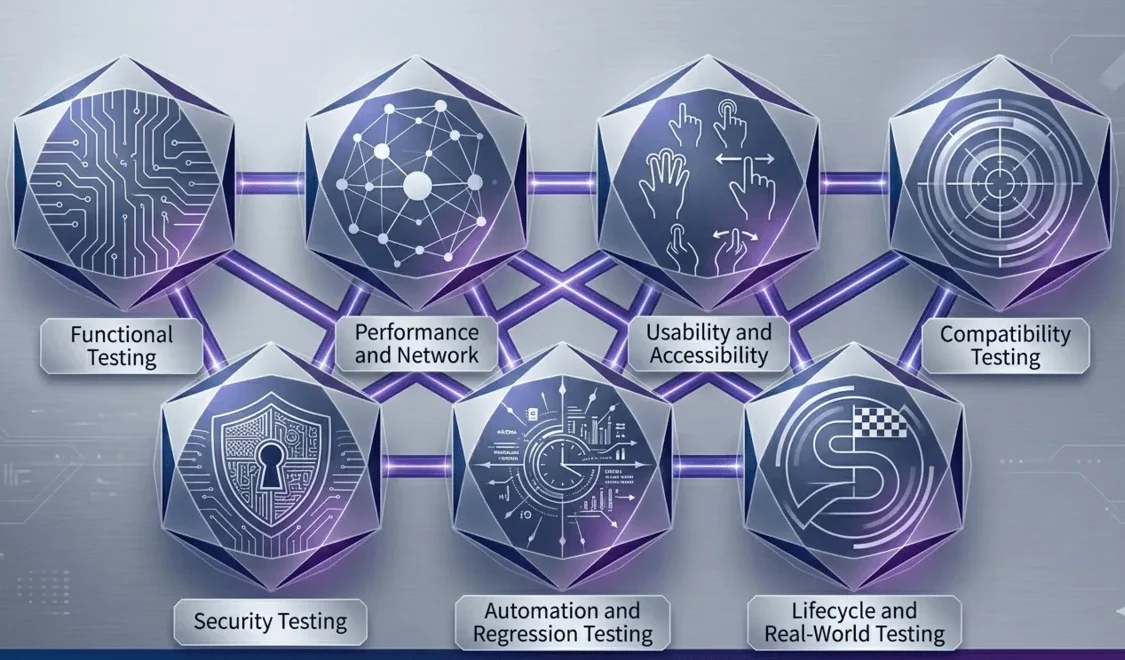
Each level of testing is meant to test a specific risk. Missing out on one of these layers will cause some holes to appear later.
1. Functional Testing
This ensures that the app behaves as expected across all defined scenarios.
It covers:
- User flows and navigation paths
- Business logic and workflows
- Data validation
- Core feature behavior
Functional testing forms the base of all mobile app QA testing efforts. If this layer is unstable, every other layer becomes unreliable.
2. Performance and Network Testing
Performance is not limited to speed. It reflects consistency under varying conditions.
This layer focuses on:
- Response time under load
- Stability during peak usage
- Behavior across different network conditions
- Memory usage and battery consumption
Many apps perform well in controlled environments but struggle with real-world variability. This layer addresses that gap.
3. Usability and Accessibility Testing
A functional app can still fail if it feels difficult to use.
This testing evaluates:
- Navigation clarity
- Interaction simplicity
- Visual hierarchy
- Accessibility for diverse users
It ensures that users can complete tasks without friction, regardless of their context or ability.
4. Compatibility Testing
Mobile environments are highly fragmented. Consistency across devices is critical.
This includes:
- Android and iOS variations
- Device-specific behavior
- Screen size adaptability
- OS version compatibility
Without this, apps risk inconsistent performance across user segments.
5. Security Testing
Security protects both user data and business credibility.
It focuses on:
- Data encryption
- Authentication and authorization
- API security
- Storage vulnerabilities
Security gaps often have long-term consequences that go beyond technical fixes.
6. Automation and Regression Testing
As apps evolve, maintaining stability becomes harder.
This layer ensures:
- Faster regression testing cycles
- Consistent validation of repeated workflows
- Seamless integration with CI/CD pipelines
Automated mobile testing helps teams scale without compromising quality.
7. Lifecycle and Real-World Testing
This is where apps are validated beyond controlled environments.
It covers:
- Installation and update flows
- Beta testing with real users
- App behavior during interruptions
- Crash recovery and session continuity
- Localization and regional adaptability
- API and backend reliability
This helps to ensure that the application works properly throughout its lifetime.
Mobile Application Testing Process: A Structured Approach
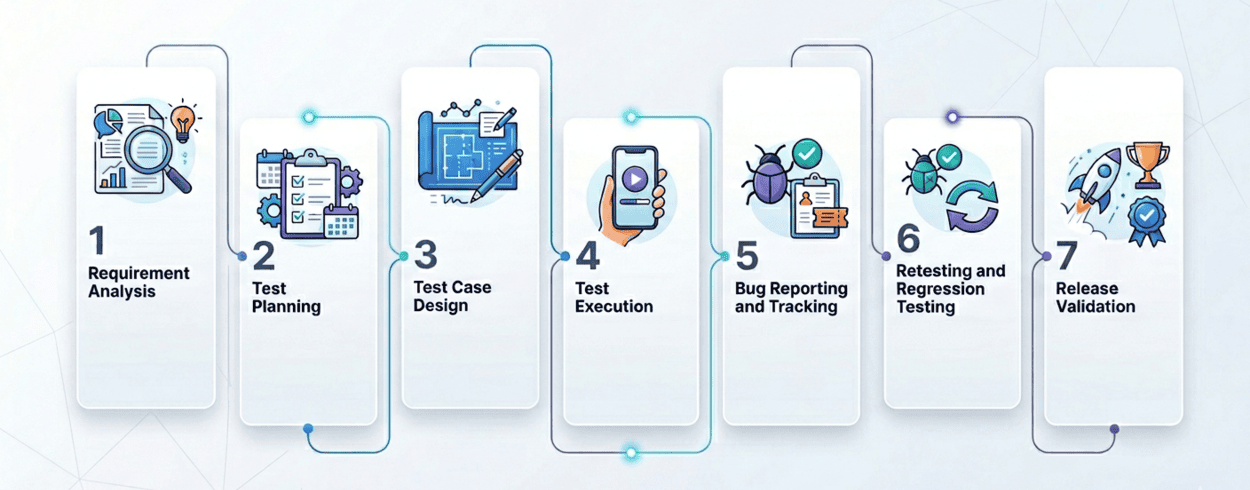
Testing becomes meaningful when conducted through a systematic process, not isolated actions.
Step 1: Requirement Analysis
The first step would involve determining what needs to be tested. Requirements specifications, performance criteria, and scenarios are determined here. This stage enables testing aligned with product objectives.
Step 2: Test Planning
The test strategy describes the approach to be followed in testing. Here we will determine what scope of testing will be conducted, which testing tools should be used, what testing environment will be used, and also what testing resources are needed.
Step 3: Test Case Design
Test cases are designed based on real user behavior and business workflows. It should be noted that the simulation will take into account real usage scenarios and not just hypothetical scenarios. Good test cases will positively influence the quality of testing in terms of coverage and relevancy.
Step 4: Test Execution
The testing phase will be executed using manual as well as automation tests. This is because there is a need for the testing to be done so that the performance level of the software can be determined and also any inconsistency noted.
Step 5: Bug Reporting and Tracking
All the bugs that are detected are recorded with their reproduction details. This means that there is priority on the bugs based on the effect that they have on the application.
Step 6: Retesting and Regression Testing
When all the bugs are fixed, the tester will conduct the final testing of the application, checking whether everything works correctly and whether the other components of the application were not affected by the bug fix. This step maintains overall product stability.
Step 7: Release Validation
The last part of the validation process is aimed at ensuring that the software conforms to acceptable standards and no unnecessary risk is taken.
Key Performance Metrics You Cannot Ignore
Top-performing applications are proven, not presumed. Here are the key performance metrics that determine performance.
| Category | Metrics |
|---|---|
| Core Performance |
|
| Network and Backend |
|
| User Experience |
|
| Stability |
|
| Metric | What It Measures | Impact on Users | Ideal Benchmark |
|---|---|---|---|
| Response Time | Speed of app interaction | Smooth user experience | < 2 seconds |
| Crash Rate | Frequency of app crashes | User trust and retention | < 1% |
| Memory Usage | Efficiency of resource consumption | Device performance | Optimized per device |
| Battery Consumption | Power usage during app activity | App retention | Minimal drain |
| API Response Time | Backend communication speed | Faster data loading | < 500 ms |
| App Launch Time | Time taken to open the app | First impression and engagement | < 2–3 seconds |
| Screen Load Time | Time to render screens/content | Seamless navigation | < 2 seconds |
| Frame Rate (FPS) | Smoothness of UI interactions | Better visual experience | 60 FPS |
| ANR Rate | App unresponsiveness frequency | Frustration and drop-offs | Near 0% |
| Error Rate | Failed API/network requests | Reliability perception | < 1% |
| Crash-Free Users | Users without crashes | Overall app stability | > 99% |
| Session Success Rate | Error-free user sessions | Task completion and trust | > 95% |
| Recovery Time | Time taken to recover after failure | Continuity of user experience | < 2–5 seconds |
Mobile Testing Best Practices That Scale
Testing methodologies become more sophisticated as products become more complex. Here are some mobile testing techniques that keep your testing processes consistent.
- Shift Testing Left: Start testing early in the development process. This prevents expensive rework in the future.
- Manual & Automated Testing: Automation saves time. Manual testing adds human insight. Both are essential to cover all bases.
- Tests on Real Devices: Simulation cannot reproduce the real-life environment. Testing on real devices would help spot potential issues related to performance and compatibility.
- User-Centric Testing: Mobile applications need to be developed with the user in mind. Simulated testing is not enough to spot all real-life issues.
- Integration of CI/CD Testing: Every new change needs to be tested before it goes live.
- Tests Post-Deployment: Tests still have to take place after deployment in order to catch possible issues.
The choice of tool varies depending on your specific case.
- Appium: The most popular automated testing tool for mobile apps; works on both Android and iOS.
- Selenium: Another useful tool which enables automated website testing; can also work for mobile app testing.
- TestComplete: An automation testing tool used to conduct user interface tests for multiple platforms.
- Firebase Test Lab: A tool that automates the testing of applications on actual devices in the cloud.
- XCUITest: A native framework for iOS app testing.
- Espresso: Google’s testing framework for Android applications.
Testing Methods vs Use Cases
| Testing Method | Best Use Case | Strength | Limitation |
|---|---|---|---|
| Manual Testing | Usability and exploratory testing | Human insight | Time-consuming |
| Automation Testing | Regression and repetitive tests | Speed and scalability | Initial setup effort |
| Performance Testing | Load and stress scenarios | Real-world simulation | Complex setup |
| Security Testing | Vulnerability detection | Risk mitigation | Requires expertise |
| Compatibility Testing | Device and OS validation | Wide coverage | Resource intensive |
Common Mobile App Testing Challenges
Even experienced teams encounter issues repeatedly.
- Device Diversity: The vast array of devices makes comprehensive testing challenging.
- Network Differences: Apps have to work on various networks with varying levels of disruption.
- Frequent Releases: Continuous updates limit the testing window.
- Environment Constraints: Realistic test environments may be hard to achieve.
- Automated Test Updates: Automated tests need updating alongside the application.
Mobile App Testing Checklist
| Pre-Release Checklist | Post-Release Checklist |
|---|---|
|
|
Suggestions to Strengthen Your Testing Strategy
A strong testing strategy goes beyond tools and processes.
- Build testing into product culture
- Prioritize high-impact test scenarios
- Use data to guide testing decisions
- Continuously refine testing workflows
- Invest in skilled QA teams
Testing maturity is often what separates stable products from fragile ones.
Closing Thoughts
Being a high performer does not mean that an application needs to have plenty of features. Being reliable in offering them despite all kinds of obstacles is what makes an application a high performer.
Mobile app testing methods are not something one should be thinking about once and for all. Testing methods adapt to users’ demands, the range of devices available, etc.
The difference shows up where it matters most. In user retention. In ratings. In long-term product credibility.
About iProgrammer
At iProgrammer, mobile app development is approached with a clear understanding of how performance shapes user experience. Testing is integrated into every stage of development, ensuring that applications are stable, responsive, and ready for real-world use.
If you are building or scaling a mobile product, the approach you take toward testing will define how it performs in the market.
Explore how a structured development and testing approach can strengthen your app’s performance.
1. When should mobile app testing begin?
2. How does AI improve mobile app testing?
3. Why is cloud-based mobile testing beneficial?
4. What’s the difference between emulators and real devices?
5. How do you choose the right mobile app testing partner?