





Why say NO to no code/low code App development

- Why Low-Code Became Popular
- Where Low-Code Works Well
- Where Low-Code Starts Failing
- Security Concerns Enterprises Cannot Ignore
- Scalability Concerns That Appear Later
- Real Implementation Scenarios
- The Enterprise Decision Framework
- Governance Model for Enterprise Low-Code
- AI, Low-Code, and the Next Enterprise Shift
- When Hybrid Development Works Best
- Where Custom Development Remains the Better Choice
- Final Take
- How iProgrammer Helps Enterprises Make the Right Call
- FAQs
Low-code usually enters the business through one small problem. A team is tired of waiting for a simple approval flow. Someone builds it quickly. The form works, the workflow moves, and the first reaction is relief. That is where the key decision begins.
Low-code can be excellent for internal tools, dashboards, approvals, and MVPs. It helps teams move faster when the use case is simple and contained. They have changed how teams test ideas and move faster. Gartner projects the low-code development technologies market to reach $58.2 billion by 2029, driven by agentic AI, citizen development, and operational efficiency.
But enterprise applications are rarely simple for long. They start needing integrations, access control, audit trails, performance, security, and long-term ownership.
This blog looks at where low-code works, where it fails, and how enterprises can choose the right build approach before a quick solution becomes a future limitation.
Why Low-Code Became Popular

Low-code became popular because enterprise demand outpaced engineering capacity. Business teams needed applications faster than IT could deliver them. Low-code platforms gave business users a way to participate. They could create forms, connect data, build workflows, and launch small tools. This reduced waiting time and improved ownership.
For IT teams, low-code offered another benefit. It helped clear low-complexity work from the engineering queue. Developers could focus on systems that needed architecture, security, performance, and long-term control.
The rise of AI has made this even stronger. Gartner said 63% of surveyed organizations were piloting, deploying, or had deployed AI code assistants by Q3 2023. It also predicts 75% of enterprise software engineers will use AI code assistants by 2028.
This matters because low-code is no longer only drag-and-drop development. It is moving toward AI-assisted application creation. Users can describe workflows, generate screens, build connectors, and automate actions faster.
That sounds powerful. It also increases the need for governance. A faster tool can create faster value. It can also create faster risk when used without controls.
Where Low-Code Works Well
Low-code works best when the application has clear boundaries. The process should be understandable, repeatable, and easy to change.
A good example is an internal approval workflow. A department may need approval for travel, procurement, asset requests, or leave exceptions. The process has defined users, simple rules, and limited data exposure.
Low-code can also work for departmental dashboards. A team may need visibility into requests, pending approvals, or SLA status. If the dashboard reads from approved data sources, the risk remains manageable.
MVPs are another strong fit. Founders and product teams can test ideas quickly. They can validate user interest before investing in full-scale development.
Enterprises can use low-code for temporary operational tools as well. A logistics company may need a claims tracker during a vendor transition. A manufacturing team may need a shift-level inspection checklist. A healthcare group may need a non-clinical visitor management process.
These tools do not need heavy architecture from day one. They need speed, usability, and basic governance.
Low-code also helps when business users understand the process better than developers. A claims manager may know every exception in the claims flow. A procurement lead may know which approvals delay vendor onboarding. Low-code lets these users contribute directly.
The best results appear when IT remains involved. Business teams can design the workflow. IT can define data access, integration rules, identity controls, and release practices. Low-code should feel fast for users. It should not feel uncontrolled for the enterprise.
| Enterprise Scenario | Low-code Fitment | Best Approach | Risk Level |
|---|---|---|---|
| Internal approval workflows | High | Low-code with IT-defined access rules | Low |
| Department dashboards | High | Low-code with approved reporting datasets | Low |
| MVP for a new product idea | High | Low-code prototype, then architecture review | Medium |
| Customer feedback forms | High | Low-code with consent and retention rules | Medium |
| Vendor onboarding | Medium | Low-code workflow with ERP integration controls | Medium |
| Field service inspection app | Medium | Low-code if offline logic is limited | Medium |
| CRM extension | Medium | Hybrid build with API and role control | Medium |
| ERP customization | Low | Custom development or certified ERP module | High |
| Banking transaction workflow | Low | Custom architecture with audit and security controls | High |
| AI decision engine | Low | Custom engineering with model governance | High |
| High-volume consumer app | Low | Custom development with performance engineering | High |
This table is useful because it avoids broad claims. Low-code is not good or bad by default. Its value depends on the business process, data sensitivity, scale, and change frequency.
Where Low-Code Starts Failing
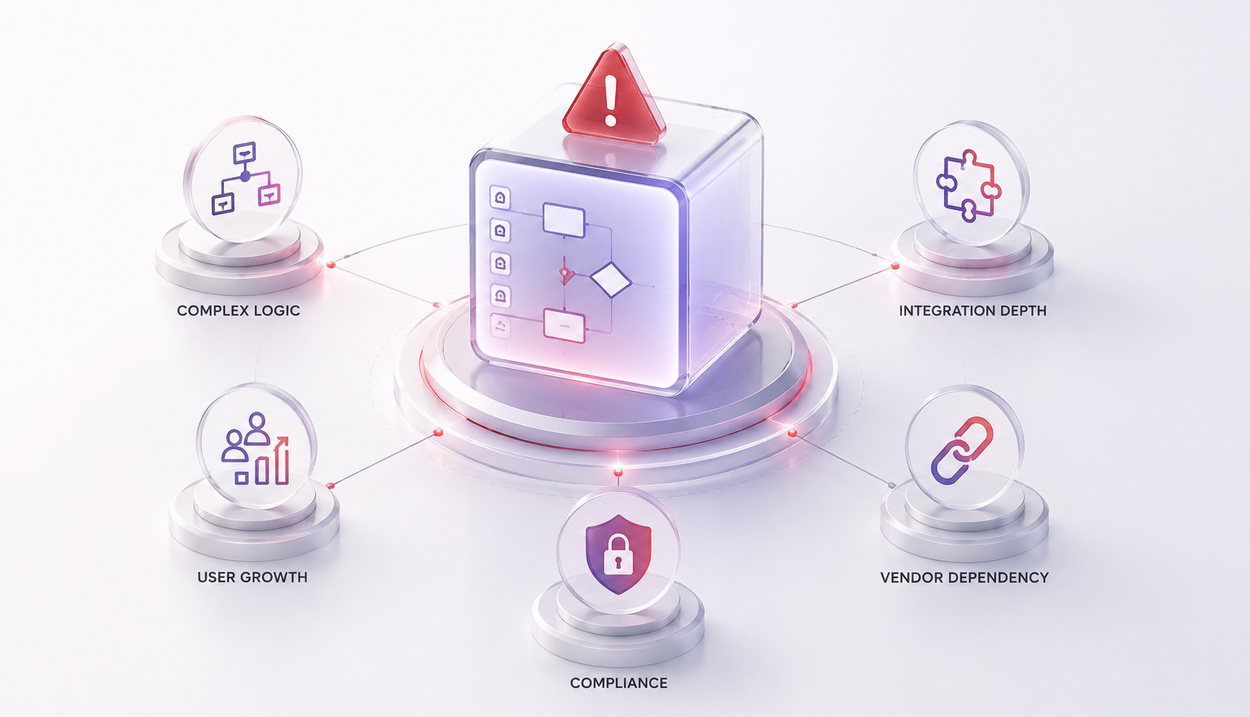
Low-code starts failing when the application becomes central to business operations.
- The first warning sign is complex logic. Many enterprise workflows have exceptions hidden inside simple names. A discount approval flow may depend on region, product line, customer type, margin, credit history, and contract terms. This becomes hard to manage through visual rules alone. Business users may keep adding conditions until the flow becomes difficult to test.
- The second warning sign is integration depth. A small app may start with one connector. Later, it needs ERP, CRM, payment gateway, identity provider, data warehouse, and notification services. Each integration brings error handling, retry logic, authentication, logging, and data mapping. These areas need engineering discipline.
- The third warning sign is user growth. A tool made for 20 users may later serve 2,000 users. The original data model may not support that load. The workflow may slow down. Reporting may become inaccurate.
- The fourth warning sign is compliance. Regulated industries cannot rely on convenience alone. They need audit trails, access logs, segregation of duties, encryption, retention rules, and evidence for reviews.
- The fifth warning sign is vendor dependency. Some platforms limit code access, deployment control, database control, or migration options. This creates long-term lock-in.
A visual workflow can become a business-critical system before anyone notices. By then, rebuilding it becomes expensive.
Security Concerns Enterprises Cannot Ignore
Security is the most serious concern in enterprise low-code adoption. The issue is not that low-code platforms are insecure by nature. Many leading platforms provide strong security features.
The issue is how easily users can connect systems, expose data, and create workflows without deep security awareness.
- OWASP maintains guidance for low-code, no-code, and citizen development risks. Its Citizen Development Top 10 project helps organizations understand common security risks and ways to manage them.
- One common issue is data leakage through connectors. A maker may connect an internal database to an external tool for convenience. The workflow may copy customer data into another system without approval.
- Microsoft’s Power Platform documentation treats data policies as a key security and compliance control. These policies help reduce the risk of users exposing organizational data through connectors.
- Access control is another concern. Enterprise systems usually require role-based access, field-level security, approval hierarchy, and segregation of duties. Low-code apps can miss these details when created quickly.
- Auditability also matters. Security teams need to know who changed a workflow, when it changed, what data it touched, and which users accessed it. Without this, incident response becomes harder.
- Secure development practices still apply. NIST’s Secure Software Development Framework recommends adding secure development practices across the software development life cycle. The goal is to reduce vulnerabilities and address their root causes.
Low-code does not remove the need for secure design. It changes where the security checks must happen.
Scalability Concerns That Appear Later
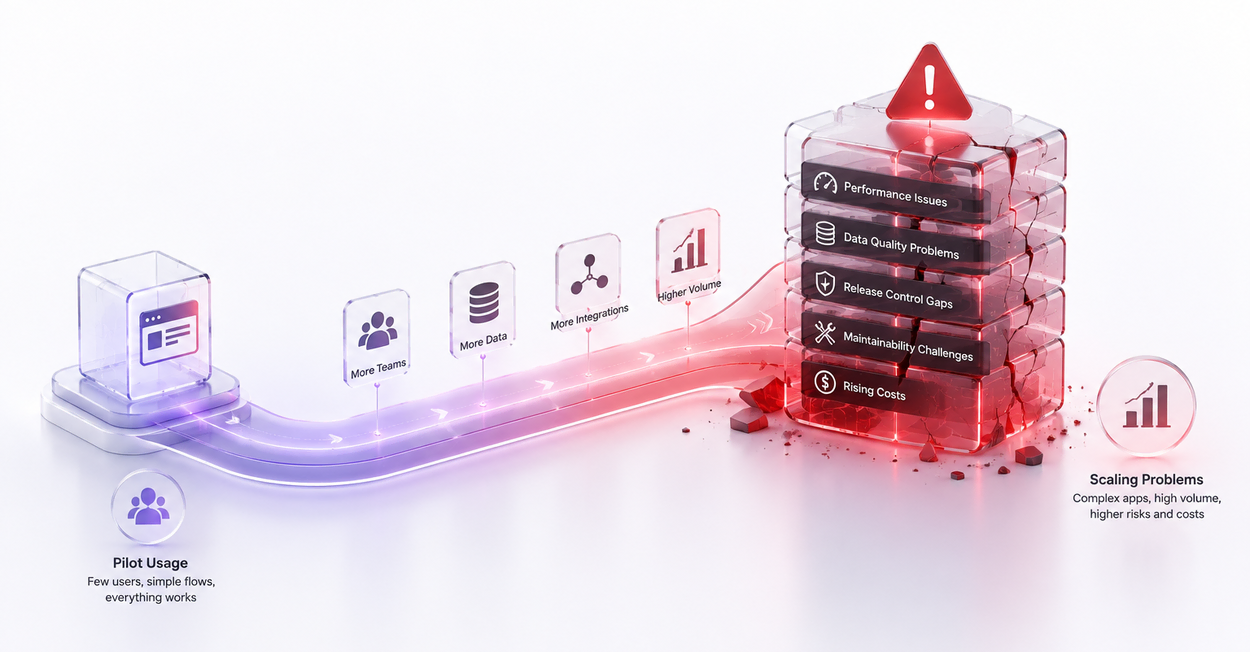
Scalability problems often appear after the application becomes useful.
A low-code app may perform well during pilot usage. Ten users submit forms. A manager approves requests. Reports load quickly. Everyone feels confident.
Then the app moves to more teams. Request volume rises. More roles are added. More integrations are connected. More data gets stored.
- The first issue is performance. Visual workflows can become slow when rules increase. API calls may hit limits. Reports may take longer because the data model was not designed for scale.
- The second issue is data quality. Users may create fields quickly without naming standards or validation rules. This causes duplicate records, missing values, and inconsistent reporting.
- The third issue is release control. Enterprise applications need development, testing, UAT, and production environments. Many low-code apps begin directly in production because the first version felt small.
- The fourth issue is maintainability. A workflow built by one business user may become hard to support after that person leaves. The logic may exist inside screens, forms, formulas, and hidden automation rules.
- The fifth issue is cost. Low-code may look cheaper during the first release. Costs can increase with premium connectors, higher usage, added environments, external users, or enterprise governance needs.
Scalability is not only about traffic. It includes teams, data, integrations, governance, support, and future change.
|
A manufacturing company may use low-code for shop-floor inspection checklists. Operators can capture readings, upload photos, and submit exceptions. Supervisors can review defects quickly.
This is a good low-code case when the process is simple. It becomes risky when the same app starts controlling production planning, machine maintenance schedules, inventory valuation, and quality release decisions. |
|
A banking team may use low-code to manage internal service requests. Employees can request account statement changes, branch supplies, or internal approvals. This keeps the use case contained.
It should not process customer financial transactions without deeper architecture. Banking systems need strict audit control, fraud checks, transaction integrity, and regulatory evidence. |
| A healthcare group may use low-code for non-clinical admin tasks. Appointment feedback, visitor logs, and staff requests can work well. Clinical workflows need more caution because patient safety and privacy are involved. |
| A logistics company may use low-code to track claims or shipment exceptions. This helps teams move faster during process change. If the app later becomes the main shipment tracking engine, custom architecture becomes safer. |
|
A sales team may use low-code to build lead qualification forms. It can connect to CRM and route records. This works when the logic is simple.
When scoring depends on AI models, customer history, credit risk, territory rules, and product fit, a custom or hybrid build makes more sense. |
| An AI product team may use low-code for a proof of concept. It can test user flows and gather feedback quickly. Production AI systems need model monitoring, prompt control, data security, evaluation pipelines, and fallback design. |
The Enterprise Decision Framework
The right decision starts with business criticality.
- If the application supports a small internal workflow, low-code may be the right choice. If it directly affects revenue, compliance, customer experience, or core operations, deeper engineering review is needed.
- Data sensitivity is the second factor. Apps that handle public data or basic operational data have lower risk. Apps that handle financial, health, employee, legal, or customer data need stricter controls.
- Integration depth is the third factor. One approved connector may be fine. Multiple systems with complex data exchange need API design, logging, retries, and monitoring.
- Expected scale is the fourth factor. A small team tool can live comfortably on low-code. A high-volume enterprise app needs performance planning from the start.
- Change frequency is the fifth factor. If business rules change often, low-code may help. If those changes affect many systems, custom code gives better control.
- Ownership is the sixth factor. Every low-code app needs an owner. It also needs support responsibility, documentation, access review, and retirement planning.
A useful enterprise rule is simple. Use low-code for speed where risk is contained. Use custom development where control matters more than speed. Use hybrid architecture when both are needed.
Governance Model for Enterprise Low-Code
| Governance Area | Business Team Owns | IT Team Owns | Security Team Owns | Engineering Team Owns |
|---|---|---|---|---|
| Process design | Workflow steps and approval logic | Platform fitment | Risk classification | Technical feasibility |
| Data access | Field requirements | Data source approval | Data exposure review | API and data model design |
| User roles | Business role mapping | Identity integration | Access policy review | Permission implementation |
| Integrations | Business need | Connector approval | Data transfer risk | API design and monitoring |
| Release process | UAT feedback | Environment control | Change risk review | Deployment and rollback |
| Support | First-level process clarification | Platform support | Incident review | Defect resolution |
| Retirement | Business sunset decision | App inventory update | Data retention check | Archive or migration |
This governance model keeps speed without losing control. It also prevents shadow applications from becoming hidden enterprise systems.
Governance should not feel like a blocker. It should make low-code safer to use.
AI, Low-Code, and the Next Enterprise Shift
AI is changing low-code in two ways.
- First, it makes app creation faster. Users can describe a workflow in natural language. The platform can generate forms, data tables, automation flows, and interface layouts.
- Second, it increases complexity. AI-powered apps may depend on prompts, models, embeddings, agents, private knowledge bases, and third-party APIs. These need more than visual workflow design.
Gartner’s 2026 technology trends include multiagent systems, domain-specific language models, AI security platforms, and AI-native development platforms. It also notes that leading organizations are pairing smaller teams with AI and governance guardrails.
This direction is important for enterprises. Low-code will not remain limited to simple forms. It will become part of AI-assisted delivery.
That creates new risks. An AI-generated workflow may look correct but miss edge cases. A generated connector may expose sensitive fields. A prompt-based app may leak internal context. An agent may take actions without proper confirmation.
Enterprise AI applications need guardrails. They need approval gates, audit logs, model evaluation, prompt versioning, and human review for high-risk actions.
Low-code can support AI experiments. Production AI systems need stronger design.
Many enterprises do not need a pure low-code or pure custom approach. A hybrid model often works better. In this model, low-code handles the interface and simple workflow. Custom services handle business logic, integrations, security, and data processing.
- A vendor onboarding app can use low-code forms. The backend can validate GST, VAT, bank details, sanctions checks, and ERP vendor creation.
- A field inspection app can use low-code screens. A custom service can process images, validate readings, and sync with ERP maintenance records.
- A customer support app can use low-code case forms. A custom AI layer can summarize history, suggest responses, and route complex cases.
This gives business users speed. It gives IT teams control over critical logic. Hybrid development also protects future migration. If core logic lives in APIs and services, the interface can change later. The enterprise does not become fully dependent on one platform. This is often the safest path for growing organizations.
Where Custom Development Remains the Better Choice
Custom development remains the better choice for high-control systems.
- Enterprise ERP extensions often need custom work. They affect finance, inventory, procurement, payroll, manufacturing, and compliance. A small change can affect reporting and audit outcomes.
- High-volume customer apps also need custom engineering. Performance, caching, security, analytics, uptime, and release control matter from day one.
- AI decision systems need custom design as well. Model selection, evaluation, data boundaries, observability, and fallback logic need careful planning.
- Complex integration platforms also need custom architecture. API gateways, queues, event streams, retries, encryption, and monitoring cannot be treated as side details.
Custom code gives teams deeper control. It supports better testing, clearer ownership, and better long-term maintainability.
The cost is higher at the start. The benefit is lower risk when the system becomes central.
Low-code has earned its place in enterprise technology. It helps teams build faster, test faster, and solve small process problems without long delivery cycles. Its weakness appears when it is used without architectural judgment.
A low-code app can begin as a team shortcut. Later, it may carry customer data, financial approvals, operational decisions, and compliance evidence. That is when the original shortcut can become an expensive rebuild. The right enterprise approach is not resistance. It is selection.
Use low-code for contained workflows, MVPs, internal tools, and departmental automation. Use custom development for core systems, regulated processes, complex integrations, AI platforms, and high-scale products. Use hybrid architecture when business speed and engineering control must work together.
At iProgrammer Solutions, we help enterprises decide where low-code fits and where custom engineering is safer.
With 300+ applications delivered, our work across enterprise applications, ERP, AI systems, cloud platforms, integrations, and product modernization gives us a practical view of this decision. We look at process complexity, data sensitivity, scalability, compliance, and future change before recommending a build path.
For some teams, that means a fast low-code workflow. For others, it means a custom application with secure architecture. Many enterprise programs need a hybrid model, where low-code accelerates the interface and custom engineering protects the core.
The goal is simple. Build software that works now and stays dependable as the business grows.
1. Can low-code replace enterprise software developers?
2. Is low-code suitable for regulated industries?
3. What is the biggest hidden cost of low-code?
4. Should enterprises allow citizen development?
5. When should a low-code MVP move to custom development?